Direct Modification and Variation of Imported NURBS Geometry
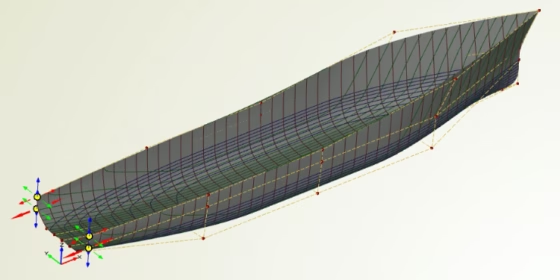
Consider you have an existing geometry from another CAD system, and you want to conduct a design study with the geometry in CAESES®. Let’s assume the geometry was exported as a set of NURBS curves and surfaces, using a standard format such as IGES or STEP. The idea now is to directly modify the NURBS entities in CAESES®. This is what you have to do: Import the geometry, select the NURBS entities and activate the edit mode. Select the control points you want to vary, and create design variables for the coordinates. That’s it. Now you can run design studies or optimizations where the design variables are changed by the CAESES® design engines. The following short video shows how it works. For shape changes, the design lab is chosen as design engine. It allows the user to create manual designs by using a set of sliders. Enjoy!