Introduction to PFF (Propeller Free Format)
For the exchange of propeller geometry data, CAESES® offers the possibility to import and export files using a format that is called PFF (Propeller Free Format). We support the PFF format since these files are widely used by ship and propeller design companies as well as classification societies. This short blog post gives you an introduction to this file format, e.g. to be able to generate your own PFF files that can be read into CAESES®. There is also a PFF file available for download at the end of this post. Note that we support only a subset of a specific PFF version, and some of the attributes that are not directly related to actual geometry are simply ignored by CAESES®. If you use a different PFF version or you need more attributes to be considered, just let us know. Alternatively, you can also write your custom import/export by using features.
Header Section
In the header section, there is some information about the name of the propeller and the date when the file was exported. CAESES® searches for the propeller diameter (see below) in the first step, so that these header comments can be neglected. In the second block of PFF files appears a line “*( Propeller Geometry (Standard)” which is followed by a company name, a person in charge, and another date entry that you can use e.g. as a “last edit” date. Again, this is not taken into account by CAESES® but usually part of the PFF file.
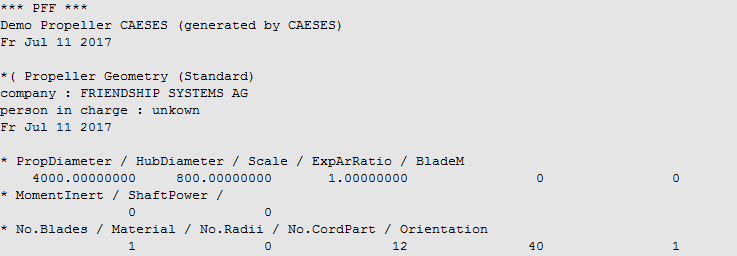
Now comes the propeller information: As you can see from the picture above, in the third block you find the propeller and hub diameters (everything always in mm), an optional scaling factor for the given values, the area ratio and a blade mass. The second part of this block contains some general information about moments and shaft power. Note that CAESES® ignores area ratio, blade mass, moments and shaft power in the current release so that only the substantial geometric quantities are considered. The next lines in the header contain the number of blades, a material flag (also ignored), number of radii i.e. sections and number of points per section (“No.CordPart”). Finally, the propeller orientation is given where the clockwise rotation (when looking from behind) is indicated by a “1”, and “0” defines the counter-clockwise rotation.
Section Data
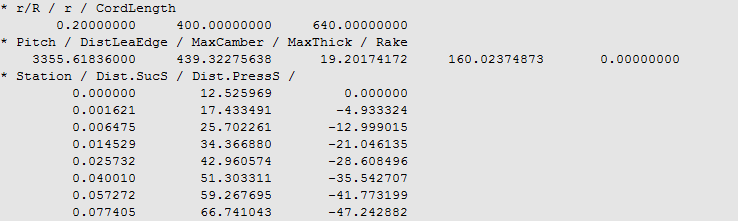
After the header section with more general information, the profile data needs to be provided. When you write 2D sectional data into a PFF file, you have to start the line with “* r/R”, see the following picture for an example:
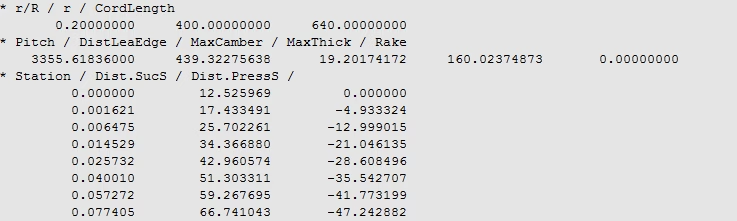
Sectional point data in normalized 2D system along with other related quantities
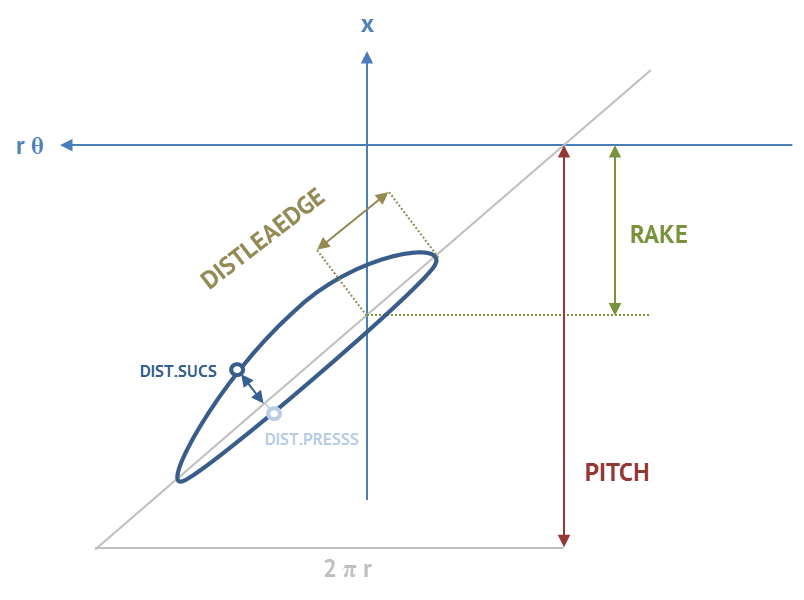
What you can find is the normalized radius, the real radius and a chord length. Important: The x‑coordinates (“Station”) of the profile run from 0 to 1, i.e. they are normalized wrt. the chord length. By using the increasing x‑stations, the coordinates for the profile run from leading edge to trailing edge. They are followed by the corresponding y‑values for suction and pressure side, respectively. We do not dig into propeller design details here, probably most of you know about things such as chord lengths, camber and thickness values, rake, skew and pitch. The term “DistLeaEdge” in the PFF file is related to the skew of the profile. See the following illustration for more information about the different terms:
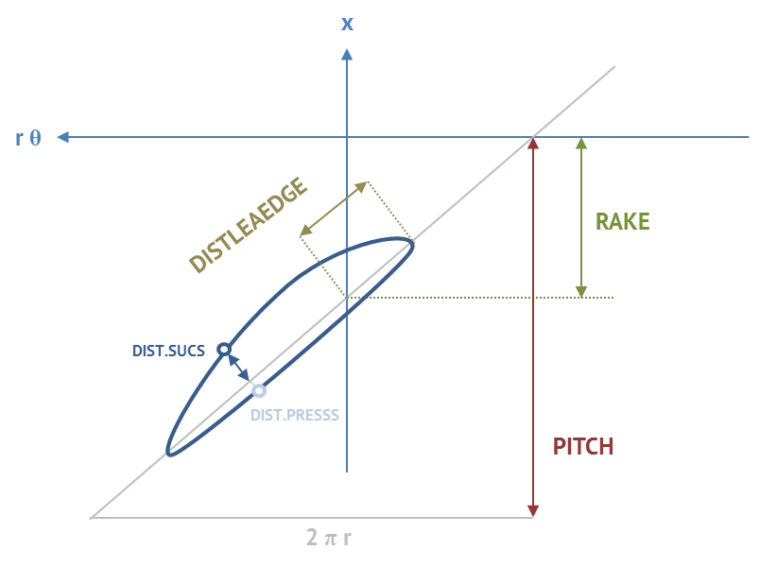
Description of the PFF attributes
After a section is finished and a new radius is coming up, it again starts with “* r/R”. The whole block with all 2D profile data ends with an indicator in two lines:

End of sectional data
Footer Section
There can be more geometry information in a PFF file — just as a side note and to let you know. However, CAESES® supports only the geometry parts that are described in this blog post, i.e. 2D section data.
Solid CAD Model from a PFF File
So what else can you do with such file data? We have recently developed a method to create a solid CAD geometry from a given PFF file with just one single click (press an import button). If you are interested in it, feel free to get in touch with us.



Solid geometry generation from PFF data
More Information
The PFF import allows CAESES® users to visualize the cross-sections and change the point data interactively (e.g. to correct them manually etc.). The manipulated propeller can be exported again into the same or a new PFF file. Alternatively, the imported data can be used as a starting point for a parametric propeller model, too. See the marine section for more information about propeller modeling.
Follow Us
Are you interested in propeller design and related topics? Then stay tuned and sign up for our newsletter to receive short reads like this one here! Don’t worry, we won’t bother you with too many emails. Of course, you can unsubscribe at any time :-)