Blade Analysis for Propellers
Quite often our users want to use a parametric CAESES® model and fit this model into their existing geometries. They import the geometry data using either a common CAD format (STEP, PARASOLID,..) or some proprietary format, and then they start fitting their CAESES® model into the imported data by changing the model parameters. In most cases, this is a manual or semi-automated process where the parameters are set in a way such that the error (least squares etc.) gets minimized. After this fitting step, a user would typically try to optimize the geometry shape further, using the fitted model as the baseline design.
At FRIENDSHIP SYTEMS, we work on generalized concepts, to fit any CAESES® model to suitable data. It’s quite a challenge to come up with a single solution for this, that’s for sure. And, of course, you cannot “easily” fit some given ship hull data into a F1 race car model, so the combination needs to make some kind of sense ;-) However, we have solved these fitting tasks several times for individual applications so that we have gained a lot of experience with this (see this case study for an example where we fitted a parametric CAESES® turbine blade into existing 3D blade sections). If one considers a specific application such as the turbine blade or a maritime propeller blade, it is much easier to offer a “generalized” method for all incoming geometries. So let’s take a look at the propeller blade:
Blade Analysis
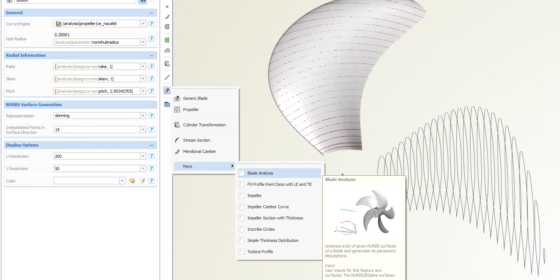
For maritime propellers, we have a nice and easy-to-use functionality in place that is called blade analysis: From a set of imported blade surfaces, you can immediately generate a fully-parametric propeller model — with a single click! This method automatically creates all the relevant radial distributions for chord, camber, thickness, rake, skew and pitch. With these functions, CAESES® sets up a parametric blade model plus a propeller object. The 3D sections and a convenient view of the 2D sections are also directly available.
The result of such an analysis is typically used as input for a custom blade with individual profile definitions. Since the characteristic distributions are given, it takes only a couple of minutes to feed custom models with this information. If you don’t need a specific model at all, then the generated blade setup can be readily used as is.
We think that a huge benefit of this analysis is that you don’t have to go through the tedious process of manually fitting e.g. rake, skew and pitch functions — this is really a boring task (the author has some experience with this). The analysis directly gives you these functions. Just a few seconds instead of hours…
Check out this short video from our tutorial section which demonstrates the blade analysis — we hope you’ll like it:
More Information
This blade analysis is part of the blade add-on of our CAESES® pro edition. Feel free to get in touch with us if you need more information. Here is another blog post that copes with comparison of blade profiles. If you are interested in trying out CAESES® for your own application then check out our product pages for more amazing details. We offer a powerful & free edition of CAESES®, which can be downloaded from our website. There are no annoying or hidden limitations, and you can directly start to set up your own intelligent model today!
Follow Us
Are you interested in blade and propeller design? Then stay tuned and sign up for our newsletter to receive short reads like this one here! Don’t worry, we won’t bother you with too many emails. Of course, you can unsubscribe at any time :-)